
Design SCADA with the
OpenBridge Design System
The inSCADA Platform supports the OpenBridge Design System — developed for maritime workplaces — in two ways: build bridge, HVAC and engine-room HMI screens directly with Web Components, or hand off Figma designs as SVG.
From Design to Production — Your Choice
Pick the approach that fits your project's needs — or combine both in the same project.
Figma → SVG → inSCADA
Prepare an OpenBridge design in Figma, export to SVG, upload to inSCADA, and bind animations and data to the SVG nodes. No CSS or JavaScript needed.
OpenBridge Web Components
Drop ready-made elements like
<obc-compass>,
<obc-gauge-radial>,
<obc-tank>
directly into your HTML. IEC 62288 compliant.
@inscada/openbridge-bundle
We packaged Ocean Industries Concept Lab's @oicl/openbridge-webcomponents library into a single ES module. You can use it directly via CDN inside inSCADA custom menus and dashboards.
Navigation Instruments
(34)Compass, heading, rate-of-turn, rudder, helm, thruster, wind and more — IEC 62288 compliant maritime instruments.
<obc-compass><obc-gauge-radial><obc-rudder><obc-wind> Automation & Schematic
(33)Pumps, motors, tanks, valves, transformers, electrical symbols and wiring primitives. Built for P&ID and single-line diagrams.
<obc-pump><obc-motor><obc-tank><obc-digital-valve> Bars & Graphs
(6)Line, Area, Pie, Donut, Polar and Radial Bar charts. Optimized for real-time data visualization.
<obc-line-graph><obc-donut-chart><obc-polar-chart> UI Components
(112+)Buttons, cards, menus, alert lists, form elements, tables, sequence cards and page layout components.
<obc-alert-menu><obc-top-bar><obc-table><obc-brilliance-menu> Two Ways to Install — CDN or Local
Industrial SCADA systems often run in environments without internet access (air-gapped). @inscada/openbridge-bundle ships with this in mind: a CDN for online projects, and local hosting via inSCADA File Management for isolated networks.
Local — inSCADA File Management
Upload the bundle files (inscada-openbridge.min.js + openbridge.css) to inSCADA File Management once;
they are served from the platform, so no internet connection is required, you control versioning, and load times stay short.
<!-- Files uploaded to inSCADA File Management -->
<link rel="stylesheet" href="/api/custom-html/assets/libs/openbridge.css">
<script src="/api/custom-html/assets/libs/inscada-openbridge-min.js"></script>
The path depends on the folder you upload to in inSCADA File Management. The example above assumes the assets/libs/ folder.
From CDN — for Online Projects
For development environments with internet access, demos or quick prototyping, you can load the bundle directly from jsdelivr.
<!-- Font (required) -->
<link rel="stylesheet" href="https://fonts.googleapis.com/css2?family=Noto+Sans:wght@400;500;600;700&display=swap">

<!-- OpenBridge theme CSS -->
<link rel="stylesheet" href="https://cdn.jsdelivr.net/npm/@inscada/openbridge-bundle/dist/openbridge.css">

<!-- All components (single file) -->
<script src="https://cdn.jsdelivr.net/npm/@inscada/openbridge-bundle/dist/inscada-openbridge.min.js"></script><div class="obc-day">
<obc-gauge-radial value="72" min="0" max="100" label="RPM"></obc-gauge-radial>
<obc-compass heading="245"></obc-compass>
<obc-wind heading="180" speedKnots="12"></obc-wind>
</div>For the npm package, local install and version pinning, see @inscada/openbridge-bundle.
Five Adaptive Themes for Bridge Operations
OpenBridge ships five color modes so bridge personnel keep their eye adaptation across changing ambient light. Switch a single CSS class on the container and the entire UI palette flips instantly.
<!-- Render all components in night mode -->
<div class="obc-night">
  <obc-gauge-radial value="72"></obc-gauge-radial>
</div>OpenBridge inside the inSCADA Platform
See how OpenBridge web components behave with real-time data inside an inSCADA custom menu.
A live HMI built with OpenBridge web components on the inSCADA Platform.
Teknotherm Marine TEMS — HVAC & Water System
In 2023, before the Web Components library was available, we delivered this project with the Figma → SVG → inSCADA approach. The method is still fully supported and remains a great fit for fully custom designs.
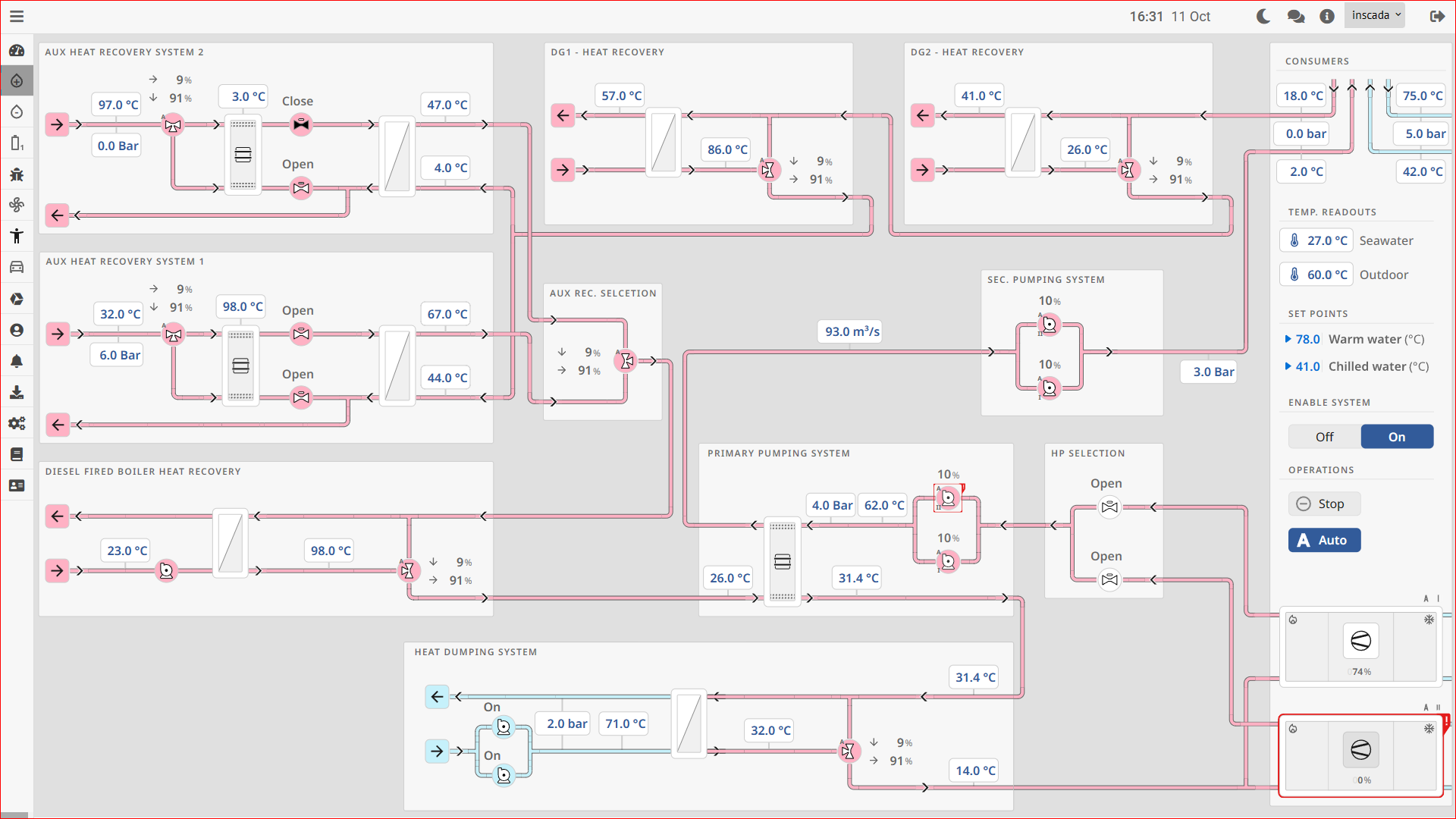
Teknotherm Marine (a Heinen & Hopman company), together with Ulmatec Thermal Solution, developed a complete Thermal Energy Management System (TEMS) for ships. Their designs were built on OpenBridge 5.0.
Together with our project partner Des Elektroteknik, we ported the entire Figma UI to the inSCADA Platform with no loss of fidelity. The revision loop between the design and implementation teams became visibly shorter.
Architecture Designed for the Maritime Industry
With OpenBridge compliance, alarm management standards and industrial protocol support, inSCADA covers the requirements of ship automation.
IEC 62288 Compliant
OpenBridge Web Components are designed in line with the IEC 62288 standard. Ready to use in maritime bridge systems out of the box.
186 Web Components
Navigation, automation, schematic, UI — 186 `<obc-*>` custom elements packaged in a single bundle, ready to use.
1900+ SVG Icons
Maritime and industrial iconography exposed as `<obi-*>` custom elements — no separate SVG management needed.
IAS & IMO Compliance
Integrated Alarm System integration, IMO alarm and event display rules, prioritization.
Siemens S7-1500
Direct communication with S7-1500 PLCs. ProfiNet, Modbus TCP and OPC UA protocol support.
Redundant Architecture
Uninterrupted operation for ship duty. Redundant servers, automatic failover, health monitoring.
Let's bring your maritime HMI to inSCADA with OpenBridge
With code-first Web Components or SVG handoff from Figma — we'll pick the path that fits your project together. Get in touch for a technical pre-call.